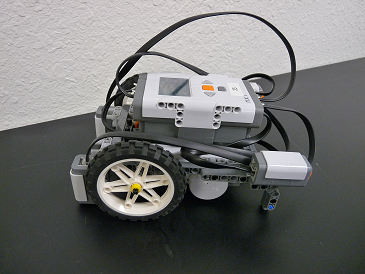
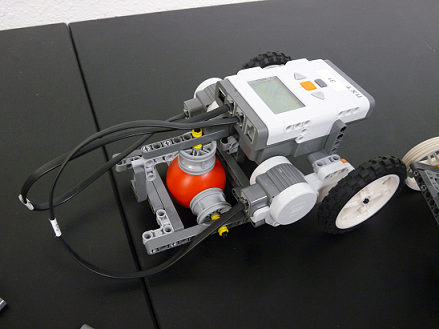
The chassis is the base of the Robot on which all missions are completed. The motor, the wheels, the brick are typically all built onto the chassis to become the chassis of the FLL robot. Everything here is my opinion and should not limit any design. Kids can come up with designs that over come any limitations.
There are lots of different chassis, some good and some not good for FLL. There are a lot of things to consider. Some things to consider are:
- Number of drive motors
- Tracks or wheels
- How, where, number, and size of wheels for the robot
- Caster vs. 3rd wheel, vs. slider
- Chassis size
- How to attach attachments
- Make the robot go straight
Number of Drive Motors
Typically there are 2 drive motors so 2 wheels driving the robot. Another design could be one drive motor and one motor to steer the robot sort of like a car. A motor driving two wheels and a motor to turn the robot left or right. With 2 drive motors, the 3rd motor is available for attachments.
Wheels or Tracks
When thinking tracks or wheels, the missions need to be considered. Tracks typically make for a slower robot and the turn can be inconsistent because the point on the tracks that make the turn may be inconsistent. However, for traction and going over small obstacles, tracks are great.
For wheels, they are move consistent on turning, wheels are typically faster, smoother, and more accurate. Wheels can have trouble getting over obstacles.
How, Where, and Size of wheels for the Robot.
The placement of the wheels are restricted by the placement and size of the motors. With ingenuity, there isn’t a lot of restriction because of the placement of motors.
The number of wheres is a big choice. With 2 wheels your robot is a teeter-toter. If you go to 3 wheel you now have a more stable robot but could have problems with turning. 4 wheels are stable but with only 2 wheels attached to motors the wheels not driven may be drug as the robot turns, and wheels to drag to well. With 4 wheels being driven by the motors (2 wheels for each motor), there still may be issues driving.
5 wheels…hmmm. I’ve never seen 5 wheel robot, but if someone has one, send me a picture. Six wheels may be OK, however there are problems turning and dragging wheels.
The size of wheels are important, too. Large wheels make the robot go faster. However, they also make the robot larch to start and stop. Going small distances may not be very easy. It may also raise the center of gravity where it may turn over easier. The smaller wheels are slower, but more powerful for going up ramps.
Caster vs. 3rd wheel, vs. slider
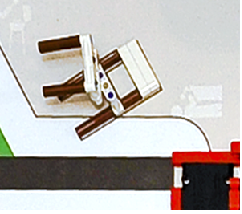
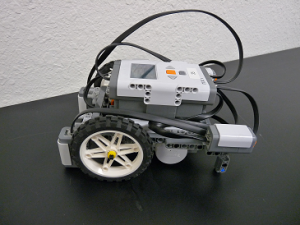
If you’re going with 3 or 4 wheels, the back wheel can be a wheel, a caster or a slider. A slider is simply a Lego piece that slides around the mat. It doesn’t roll so it can slow down the robot slightly and may not be able to be drug over obstacles. Below is a picture of a robot with 2 rear sliders.
 A rear caster using a Lego ball as a 3rd wheel. It can roll any direction for turns but it is harder to build. Below is a picture of a Lego caster.
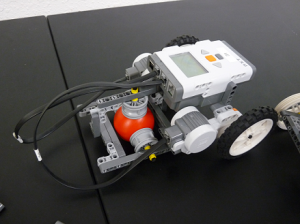 A 3rd caster wheel works well for going forward. However, if the robot backs up the caster wheel may push the robot to move at odd angles. And then when it moves forward again the wheel may start the robot out at an odd angle.

Chassis Size
First, the chassis needs fit in the base. Also, it needs to be the right size to move around the mat, between the missions and other obstacles. It also need to be low enough that it doesn’t fall over while moving around the mat.
Chassis Attachment Attaching
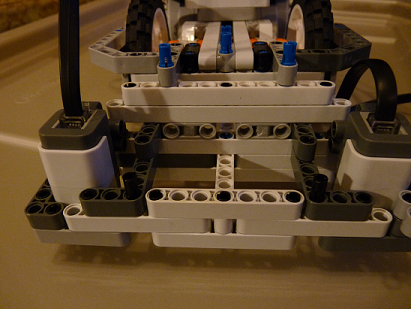
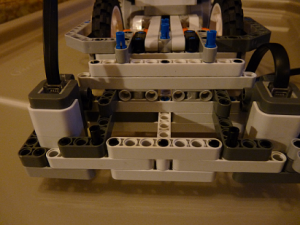
The front of the robot needs a place to attach attachments. it needs to beams with holes in in places that allow other beams to be attached. It needs to allow for quick connect and quick disconnect. Below is my chassis attachment area. It’s probably not the best but it works for me. And that’s the key, it works for you.
 How to make the robot go straight.
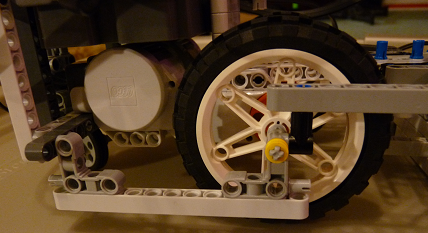
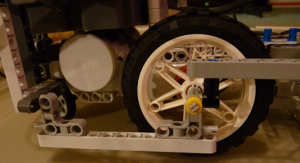
The best way to do this is by building the chassis correctly. Here is a video that helps with how to get your robot to go straight. The wheels need to be straight up and down. If they bent out at all, it could cause the robot to go crooked. Also, one thing to give the wheels more support is to put a frame around the outside of the wheels that supports them. This is shown below on my robot. The motor is on the inside of the wheels and a frame goes around the outside. The axle that goes between the frame and motor for support.
 Also, just finding wheels that are the same size is really important. Sometimes, the wheels are slightly different and that can make them turn to the side. If you choose 2 wheels, put an axle through the center of the wheels and roll them it shows if they’re the same. If the wheels roll to one side, then they are slightly different.